# 1. 设置 Git 的 user name 和 email(默认已安装 Git)
| git config --global user.name "yourname" |
| git config --global user.email "youremail" |
# 2. 生成 SSH 密钥
| 查看是否已经有了ssh密钥:cd ~/.ssh |
| 如果没有密钥则不会有此文件夹,有则备份删除 |
| 生成密钥: |
| ssh-keygen -t rsa -C “458079442@qq.com” |
| 按3个回车,密码为空。 |
| Your identification has been saved in /home/tekkub/.ssh/id_rsa. |
| Your public key has been saved in /home/tekkub/.ssh/id_rsa.pub. |
| The key fingerprint is: |
| ……………… |
| 最后得到了两个文件:id_rsa和id_rsa.pub |
| 添加密钥到ssh:ssh-add 文件名,需要之前输入密码. |
# 3. 登陆 github 系统
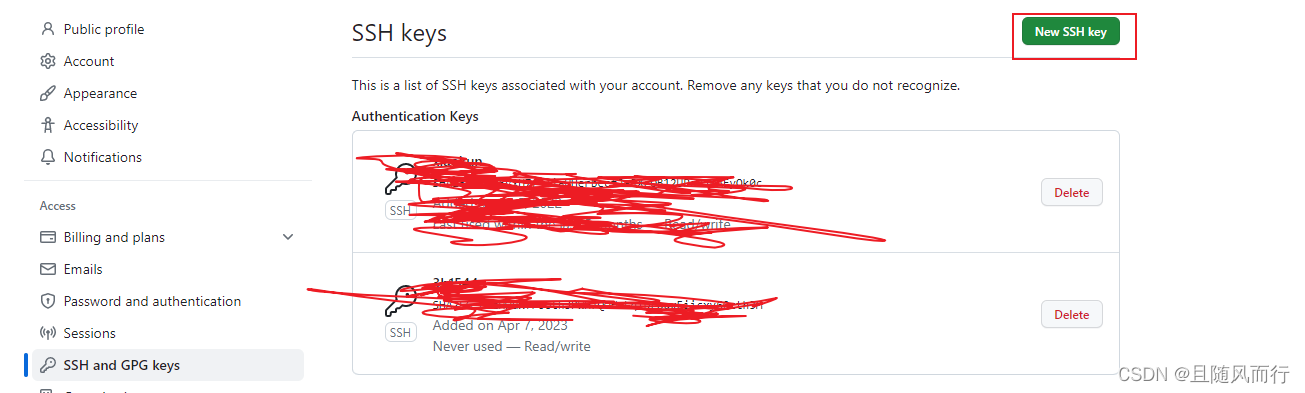
| 点击右上角的 Account Settings—>SSH Public keys —> add another public keys |
| |
| 把你本地生成的密钥复制到里面(key文本框中), 点击 add key 就ok了 |
| |
| 注意:在github上添加ssh密钥,这要添加的是“id_rsa.pub”里面的公钥。 |
![在这里插入图片描述]()
# 4. 接着打开 git ,测试连接是否成功
如果提示: Hi defnngj You’ve successfully authenticated, but GitHub does not provide shell access . 说明你连接成功了
打开 https://github.com/ , 在设置中添加密钥
| 测试:ssh git@github.com |
| The authenticity of host ‘github.com (207.97.227.239)’ can’t be established. |
| RSA key fingerprint is 16:27:ac:a5:76:28:2d:36:63:1b:56:4d:eb:df:a6:48. |
| Are you sure you want to continue connecting (yes/no)? yes |
| Warning: Permanently added ‘github.com,207.97.227.239′ (RSA) to the list of known hosts. |
| ERROR: Hi tekkub! You’ve successfully authenticated, but GitHub does not provide shell access |
| Connection to github.com closed. |
测试成功就可以 push code 了.